> ## Documentation Index
> Fetch the complete documentation index at: https://docs.blitzscan.ai/llms.txt
> Use this file to discover all available pages before exploring further.
# Understand a transaction
> A transaction taken apart party by party.
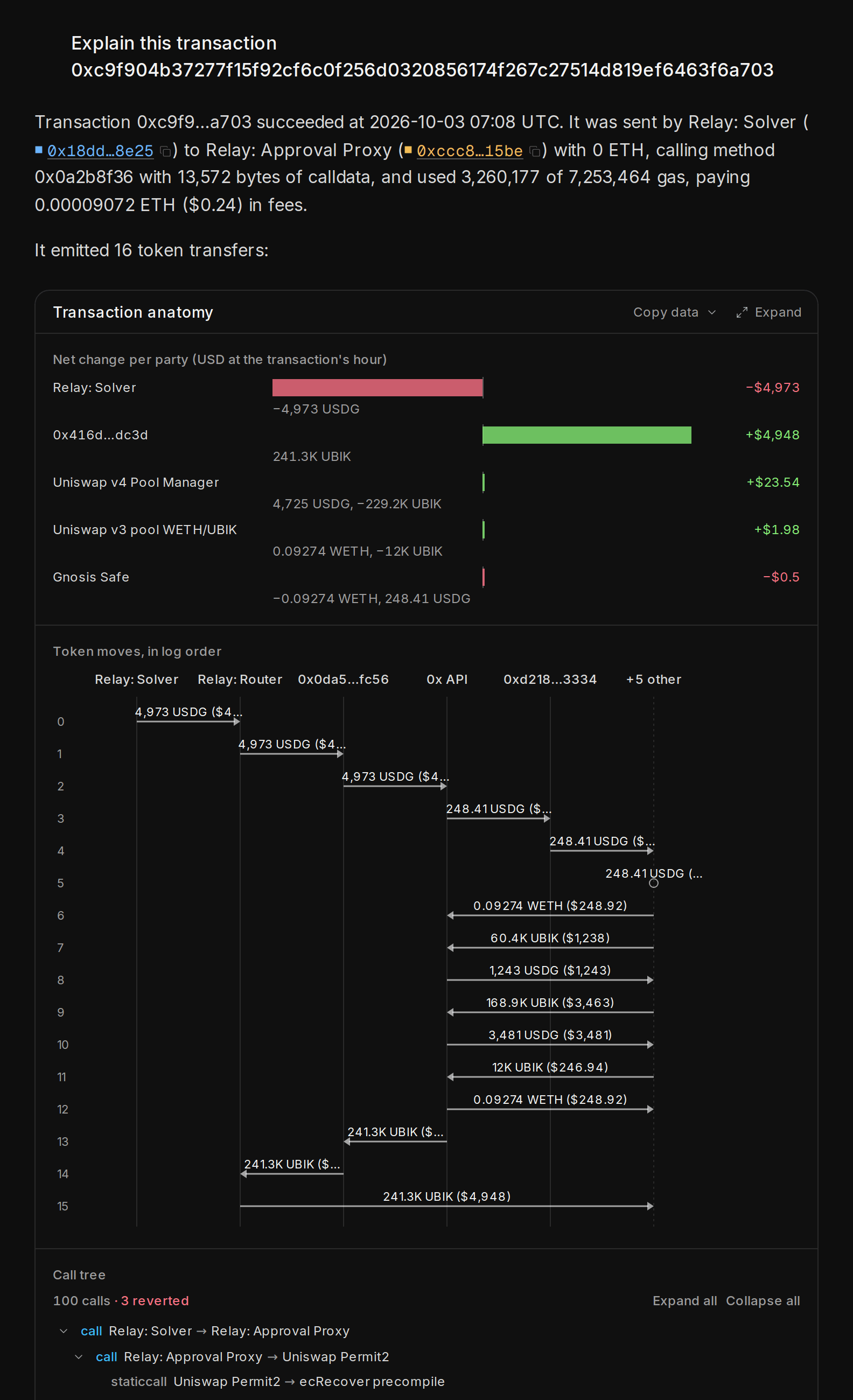
Paste a transaction hash and ask what happened. Blitzscan takes the transaction apart party by party: who sent what to whom, through which contracts, and what each party gained or lost.
 ## What you get
 * **The pattern, when Blitzscan knows it.** For example: a swap through several pools, a liquidation or an arbitrage.
* **The token flow.** Every transfer in the transaction, in order, with amounts and US dollar values.
* **The net change for each party.** What each wallet and contract has after the transaction, compared with before.
* **Names, not only addresses.** Known routers, pools and protocols show their names and a chip.
## How to do it
Paste the transaction hash (`0x` and 64 characters) and ask "What did this transaction do?". Short forms such as `0x7a4f…2b91` cannot be looked up.
The first lines say what happened in plain words. The visual under it shows the parties and the money flow.
Click a wallet or a contract in the visual to ask about it next. Or ask a follow-up: "Who is the sender?" or "What else did this wallet do that day?".
## Try these
"What is in block 70000000?"
"What are the largest trades by meme coin whales on Robinhood Chain?"
"What happened on Robinhood Chain in the last 24 hours?"
Paste a full transaction hash and ask "What did this transaction do?"
Blitzscan decodes transfers, swaps, price feeds and the protocols it knows. For other contracts it shows the calls and transfers but cannot always name the action.
This documentation is built and hosted on [Mintlify](https://mintlify.com), a developer documentation platform.
* **The pattern, when Blitzscan knows it.** For example: a swap through several pools, a liquidation or an arbitrage.
* **The token flow.** Every transfer in the transaction, in order, with amounts and US dollar values.
* **The net change for each party.** What each wallet and contract has after the transaction, compared with before.
* **Names, not only addresses.** Known routers, pools and protocols show their names and a chip.
## How to do it
Paste the transaction hash (`0x` and 64 characters) and ask "What did this transaction do?". Short forms such as `0x7a4f…2b91` cannot be looked up.
The first lines say what happened in plain words. The visual under it shows the parties and the money flow.
Click a wallet or a contract in the visual to ask about it next. Or ask a follow-up: "Who is the sender?" or "What else did this wallet do that day?".
## Try these
"What is in block 70000000?"
"What are the largest trades by meme coin whales on Robinhood Chain?"
"What happened on Robinhood Chain in the last 24 hours?"
Paste a full transaction hash and ask "What did this transaction do?"
Blitzscan decodes transfers, swaps, price feeds and the protocols it knows. For other contracts it shows the calls and transfers but cannot always name the action.
This documentation is built and hosted on [Mintlify](https://mintlify.com), a developer documentation platform.