

Fast answers and deeper research
You just ask. Blitzscan decides how much work a question needs:
When a fast answer does not settle it, press Research deeper under the answer: Blitzscan asks the same question again and researches it step by step. If research cannot finish, it says what it found so far rather than guessing.
During the beta, deeper research has a daily limit of its own, below the daily question limit; Settings, Usage shows how many questions you have left today. Past it, questions get a quick lookup until 00:00 UTC, and the answer says so in one line.
Without an account every question gets a quick lookup: you can ask three, and free questions are also limited to 20 a day for everyone on the same network (a shared office or home connection, for example). Deeper research needs you to sign in; see Sign in and wallets.
What you can ask
Some examples of what Blitzscan answers today:- Tokens: “Who are the top holders of $USDG?”, “What is the supply of $ORBIO?”, “Which tokens gained the most this week?”, “Who bought $TOKEN in its first blocks, and is it still trading?”
- Wallets: “Profile wallet 0x…”, “Where did this wallet get its first funds?”, “What did 0x… trade this month, and did it make money?”
- Traders: “Top 100 individual traders, not protocols or exchanges” leaves out exchanges, bridges, protocols and their contracts. “Which wallets hold both $A and $B?”
- Transactions: paste a transaction hash and ask what happened. Blitzscan names the pattern when it knows one (a swap through several pools, a liquidation, an arbitrage) and takes the transaction apart party by party.
- Protocols: “Which protocols are the most used?”, “What does this protocol do?”, “Who are the top users of Morpho?”, “Which DEXes grew this week?”
- Yields and lending: “Where can I earn yield on USDG right now?”, “What are the hottest pools this week?”, “Why is this lending market paying so much?” Yield answers group lending and vaults, LP pools, and speculative pools, and name the risks of each. They are never advice and never call a yield safe.
- Contract safety: “Is $TOKEN safe to buy?”, “Has anyone been able to sell it?” Blitzscan reviews the contract (owner powers, upgrades, verified source, liquidity, holder concentration, sells against buys) and reports what it found. It does not give a verdict of its own.
- Groups of wallets: “Who moves together with 0x…?”, “Are these buyers one group?” Wallets are linked only by strong evidence, such as the same funder or the same operator.
Name tokens with $
Many tokens on Robinhood Chain share a symbol: there are hundreds of contracts called HOOD and dozens called USDG. Type $ and the start of a symbol to open the token list:
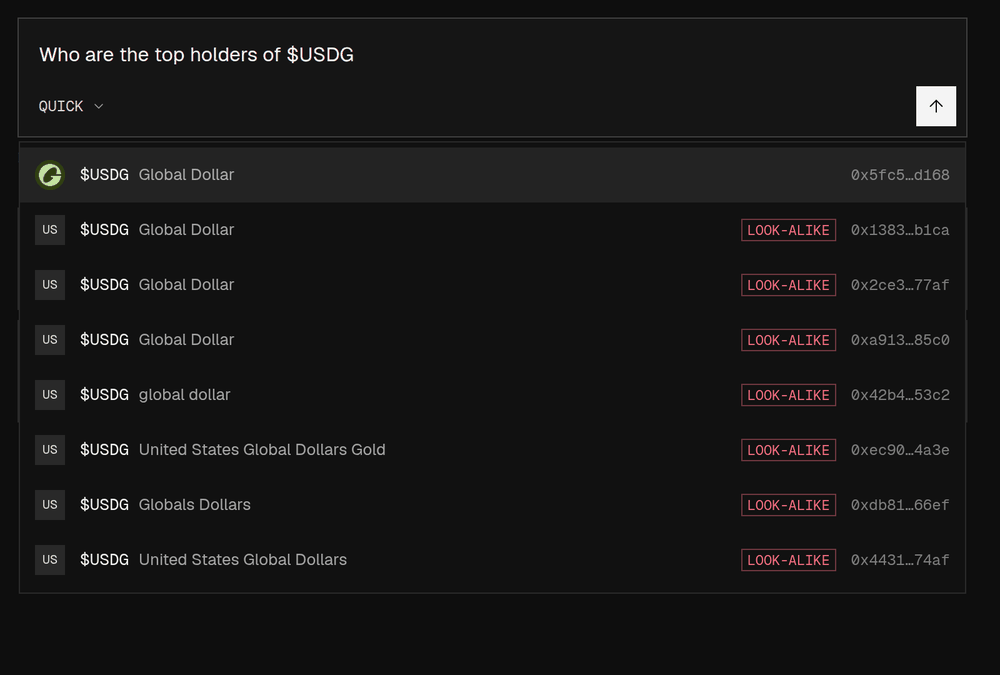
The token list for $USDG: the recognised contract first with its logo, look-alikes marked
- The list narrows as you type (
$NV,$NVD). Use the arrow keys and Enter or Tab to pick, or tap a row; Esc closes it. - The recognised contract for a symbol comes first, with its logo. Copies are marked LOOK-ALIKE (another contract is the recognised one) or SHARED SYMBOL (several busy contracts use the symbol and none is the recognised one). Each row shows the start and end of the contract address.
- Picking a row writes
$SYMBOLinto your question and remembers that exact contract, so the answer is about the token you chose. - A
$SYMBOLyou type without picking is read as the recognised token for that symbol, when there is one. “$100” is read as an amount, not a token.
Name wallets, transactions and blocks
Paste a full address (0x and 40 characters) for a wallet, contract or token, a transaction hash for “what did this transaction do”, or a block number. Short forms such as 0x7a4f…2b91 cannot be looked up. Well-known names work too: “the Uniswap v4 Pool Manager” or “RobinSwap pools”.
Ask about your own wallet
Signed in, you can ask about your own wallets in the first person: “What’s in my wallet?”, “What is my PnL on PEPE this month?”, “Which of my tokens are down?”, “Who have I sent the most USDC to?”, “Is my wallet exposed to NVDA?”. This is rolling out during the beta, so it may not be on for your account yet.- Which wallets are yours. The wallets linked to your account (sign in with a wallet to link it), and up to ten addresses you add to watch in Settings, Connected accounts, My wallets. Blitzscan never takes them from the question.
- More than one. Blitzscan asks which wallet you mean.
- None yet. Blitzscan says so and offers a Connect a wallet button; nothing is charged. You can also paste the address into the question.
- In the answer your wallet is marked YOU.
- Private to you. Your list is used only for your own questions, and only you see it in Settings. If you share a thread about your wallet, readers of the link see its address, as in any shared answer, but not the YOU mark.